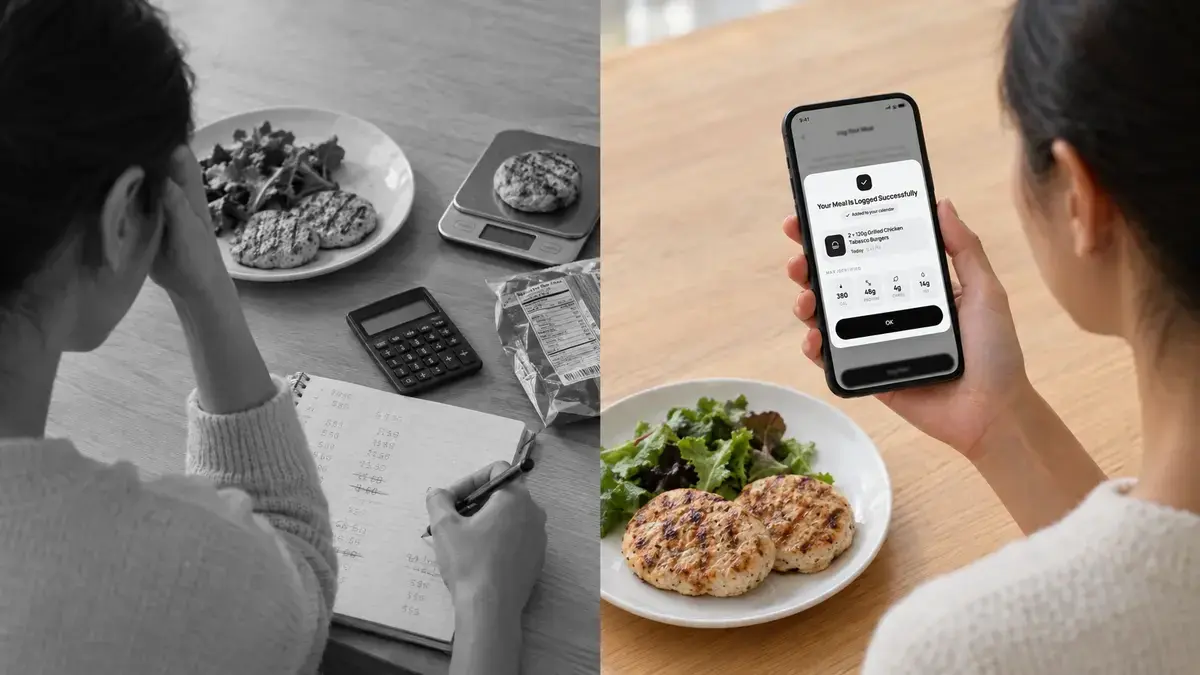
You start tracking your food on a Monday. By Wednesday you know the exact calories in your breakfast oats. By the second week, you're spending five minutes trying to log a homemade curry, scrolling through dozens of database entries that all say something different. By week four, you've stopped logging altogether.
This is the most common way food tracking fails. Not because people pick the wrong diet or the wrong goal, but because the tracking itself becomes too tiring to keep up.
So when people compare a photo calorie counter with manual logging, the real question isn't only which one is more accurate. It's which one you will still be using three months from now. This guide breaks down how each method works, where each one falls short, and which approach gives you better results over the long run.
Why Consistency Beats Perfect Accuracy
Food tracking only works if you actually do it. A 2011 systematic review published in the Journal of the American Dietetic Association looked at self-monitoring in weight loss and found a consistent link between regular food tracking and better outcomes. The key word there is regular.
Think about what happens when tracking is inconsistent. You log carefully on weekdays, skip the weekend, and forget the snacks. Your app then shows a daily average that looks great on paper but doesn't reflect what you actually ate. You make decisions based on incomplete data, and when the scale doesn't move, it feels like the process is broken.
Now compare that with a method that's slightly less precise per meal but captures everything you eat, every day. Those small errors tend to even out over time, and you end up with a far more honest picture of your habits.
In simple terms, a complete log with small errors is more useful than a perfect log with big gaps.
What Is Manual Calorie Logging?
Manual logging is the traditional way of tracking food. You search a nutrition database, pick the entry that best matches what you ate, enter your portion size, and repeat for every item on your plate.
For some foods, this works well. Packaged products with a barcode can be logged quickly and reliably. Simple, single ingredient foods like an apple or a boiled egg are easy to find.
The trouble starts with everything else: home-cooked meals, restaurant dishes, mixed plates, and anything without a label. That happens to be most of what people actually eat.
Where Manual Logging Breaks Down
It takes a lot of time: Logging a home-cooked meal with several ingredients can mean entering each one separately, then estimating how much of the total dish you ate. Across three meals and a couple of snacks, that adds up to a real daily time cost.
Database entries are inconsistent: Search for "chicken biryani" or "pasta salad" and you'll often find dozens of entries, many user-submitted, with calorie counts that vary widely. Picking one is often a guess.
Portions are rarely measured: Most people don't weigh their food. "One cup of rice" or "one serving" ends up being an estimate, which means the precision of manual logging is often more of a feeling than a fact.
People log selectively: When logging feels like a chore, the meals people skip are usually the ones they feel less good about: the late-night snack, the extra slice, the weekend takeaway. Those are often the meals that matter most.
People underreport without meaning to: A well-known 1992 study in the New England Journal of Medicine found that participants underreported their food intake by nearly half. This wasn't dishonesty. Estimating what you ate from memory and rough portions is simply hard to do well.
Manual logging can be very accurate for a dedicated person with a food scale and plenty of time. For most people living normal, busy lives, it slowly becomes less accurate and less consistent.
What Is a Photo Calorie Counter?
A photo calorie counter lets you take a picture of your meal and uses AI to identify the foods on your plate, estimate portion sizes, and calculate calories and macronutrients. Instead of building your entry item by item, you point your camera at your plate and get a breakdown in seconds.
This is sometimes called a snap a photo calorie app or an AI calorie counter. The idea is the same: you remove the searching, scrolling, and typing that make manual logging feel like homework.
If you want a closer look at how the technology behind this works, our guide to AI meal logging walks through it step by step.
Photo Calorie Counter vs Manual Logging: A Side by Side Comparison
| Photo Calorie Counter | Manual Logging | |
|---|---|---|
| Time per meal | A few seconds | Several minutes for complex meals |
| Home-cooked and mixed dishes | Recognized from a single photo | Each ingredient entered separately |
| Restaurant and takeaway meals | Snap and log | Often guesswork |
| Portion estimation | Estimated by AI from the image | Estimated by you, unless you weigh food |
| Accuracy in everyday use | High with modern AI | Depends on database choice and portion guesses |
| Likelihood of sticking with it | High, because effort is low | Tends to drop off after a few weeks |
The difference between the two comes down to one question: how much effort does each meal cost you? Photo logging costs seconds. Manual logging costs minutes. Over weeks and months, that gap decides whether you keep going.
How Accurate Are Photo Calorie Apps?
Accuracy is where most skepticism about photo logging comes from, and it's a fair concern. Early photo calorie apps struggled with mixed dishes, hidden ingredients like oil and sauces, and judging portion sizes from a flat image.
Modern AI has improved a lot in all of these areas. Today's food recognition models can identify multiple items on a single plate, estimate how much of each one is there, and return a detailed breakdown of calories, protein, carbs, and fat.
It's also worth being honest about manual logging here. Manual entries feel precise because you typed in a number, but that number depends on choosing the right database entry and guessing your portion correctly. In everyday use, both of those steps introduce error. So the real comparison isn't "perfect manual data vs imperfect photo data." It's two estimation methods, one of which is far easier to use consistently.
Max AI is built with accuracy at the center, delivering up to 99% accurate nutrition data from your meal photos. That means you get the speed of photo logging without giving up the reliability you'd expect from careful manual entry.
Why People Stop Tracking Calories
Most people don't quit tracking because they lose interest in their goals. They quit because of friction.
Every habit has a cost. When a task takes five seconds, it happens almost automatically. When it takes five minutes, it needs motivation, and motivation is exactly what fades after the first few weeks of any new routine. Busy days, social meals, travel, and stress all make that five minute task easier to skip.
Once you skip a few meals, the log starts to feel pointless. And once the log feels pointless, it's easy to stop entirely.
A photo calorie counter works because it lowers the cost of each entry so much that logging fits into the moments you already have. You take the photo before you eat, and you're done.
When Manual Logging Still Makes Sense
Manual logging still has a place. It can be the right choice if:
- You're preparing for a competition such as bodybuilding or a weight class sport, where gram-level precision matters.
- You're following a clinically supervised plan that requires exact measurements.
- You're logging a packaged product with a barcode and a clear serving size.
- You genuinely enjoy the detail of weighing and entering every ingredient.
For everyday health goals like losing fat, building muscle, eating more protein, managing energy, or simply understanding your habits, the consistency of photo logging is usually more valuable than the extra precision of manual entry.
Common Mistakes When Using a Photo Calorie Counter
Photographing after you've started eating: A half-eaten plate is much harder to read. Take the photo first.
Leaving things out of the frame: Drinks, sauces, dressings, and side dishes all count. Make sure they're in the photo or logged separately.
Shooting in poor lighting: Dim restaurants and harsh shadows make foods harder to identify. Natural light or a well-lit table helps the AI see what's on your plate.
Only logging "good" meals: The value of tracking comes from the full picture. The dessert, the second helping, and the late-night snack are part of your data too.
Judging your progress on a single day: Any tracking method, photo or manual, works best when you look at trends over two to four weeks rather than one day's numbers.
Why Calorie Numbers Only Make Sense With Context
Here's the bigger issue. Even a perfectly logged meal is just a number until you know what it means for you.
Two people can eat the exact same 600 calorie lunch and need completely different advice. One might be training for a half marathon and need more carbs to recover. The other might be managing a health condition, sleeping poorly, and trying to lose fat without losing muscle. The same meal fits into each person's day very differently.
Generic AI chatbots can tell you roughly how many calories are in a meal, but they usually answer each question in a vacuum. They don't remember your goals from last week, can't see your wearable data, and don't know about your health history or recent blood work.
That's the gap Max AI was built to close.
How Max AI Makes Photo Logging Actually Useful
Max AI is the AI health and fitness coach inside Maxiom. He doesn't just count what's on your plate. He helps you understand what that meal means for your body and your goals.
He logs your meals from a photo: Snap a picture and Max AI identifies your food and returns an accurate breakdown of calories and macros in seconds, so logging never becomes the reason you quit.
He remembers your health profile: If you have a medical condition, specific dietary needs, or long-term goals, Max AI keeps that context between conversations. You don't need to re-explain your situation every time you log a meal or ask a question.
He understands your lab results: Upload your blood work as a PDF and Max AI can factor relevant markers into his guidance, instead of treating you like an average user.
He reads your wearable data: Max AI connects with Apple Watch, Oura, Whoop, Garmin, and Fitbit, so he can see how your sleep, activity, and recovery relate to what you're eating. On a heavy training day, he can help you adjust your intake to support recovery, something we cover in more detail in our guide to adaptive recovery nutrition.
So when you snap a photo of your lunch and ask, "Is this enough protein for today?", his answer is based on your training, your recovery, your goals, and your health history, not a one size fits all rule.
The Bottom Line
Manual logging can be precise, but for most people it's too slow and tedious to keep up for months. A photo calorie counter trades a small amount of per-meal precision (and with modern AI, very little) for a huge gain in consistency, and consistency is what actually drives results.
Use manual logging when you need exact measurements for a specific reason. For everyday health and fitness goals, choose the method you'll still be using long after the first few weeks.
If you want food tracking that's fast, accurate, and built around your body, let Max AI handle the logging and connect it to your goals, wearable data, and health profile. Start with Maxiom and make tracking a habit that finally sticks.
Frequently Asked Questions
What is a photo calorie counter?
A photo calorie counter is an app that uses AI to estimate the calories and nutrients in a meal from a picture. You take a photo of your plate, and the app identifies the foods, estimates portion sizes, and calculates calories, protein, carbs, and fat. It removes the need to search a food database and enter each item by hand. This makes food tracking much faster and easier to keep up over time.
Are photo calorie counters accurate?
Modern photo calorie counters have become highly accurate thanks to advances in AI food recognition and portion estimation. Max AI delivers up to 99% accurate nutrition data from meal photos. In everyday use, photo logging often matches or beats manual logging, because manual entries depend on choosing the right database item and guessing portions correctly. Taking clear, well-lit photos before you eat helps improve results further.
Is manual calorie counting more accurate than using a photo app?
Manual calorie counting can be very precise when you weigh every ingredient and choose verified database entries. In real life, most people estimate portions and pick whichever entry looks closest, which introduces error. Research has also shown that people tend to underreport what they eat when tracking manually. For most people, a photo app gives comparable accuracy with far less effort, which leads to more consistent tracking.
What is the best way to track calories long term?
The best way to track calories long term is the method you can realistically keep up every day. For most people, that means a low-effort approach like photo logging, because it takes seconds per meal and fits into busy routines. Consistent tracking with small errors gives you more useful data than precise tracking with big gaps. Reviewing your trends over a few weeks, rather than focusing on single days, also helps you stay on track.
Why do people stop tracking calories?
Most people stop tracking calories because it takes too much time and effort. Searching databases, estimating portions, and entering every ingredient becomes tiring after a few weeks, especially on busy days. Once a few meals are skipped, the log starts to feel pointless and it's easy to quit entirely. Reducing friction, for example by logging with a single photo, is one of the most effective ways to make the habit last.
Can a photo calorie counter handle home-cooked and mixed meals?
Yes, modern photo calorie counters can identify multiple foods on a single plate and estimate each portion. This is one of their biggest advantages over manual logging, where a home-cooked dish often has to be broken down ingredient by ingredient. For the best results, make sure every part of the meal, including sauces and sides, is visible in the photo. Max AI analyzes the full plate so you don't have to enter each item yourself.
When should I use manual logging instead of a photo calorie counter?
Manual logging makes sense when you need exact, gram-level measurements. This includes preparing for a physique or weight class competition, following a clinically supervised nutrition plan, or logging packaged foods with clear serving sizes. Some people also simply enjoy the detail of weighing their food. For everyday goals like fat loss, muscle gain, or better eating habits, photo logging is usually the more practical choice.
How is Max AI different from a regular photo calorie app?
Most photo calorie apps stop at counting calories and macros. Max AI also remembers your health profile, reads your lab and blood work results, and connects with wearables like Apple Watch, Oura, Whoop, Garmin, and Fitbit. This lets him interpret each meal in the context of your goals, health conditions, sleep, and activity. The result is personalized nutrition guidance rather than just a number on a screen.