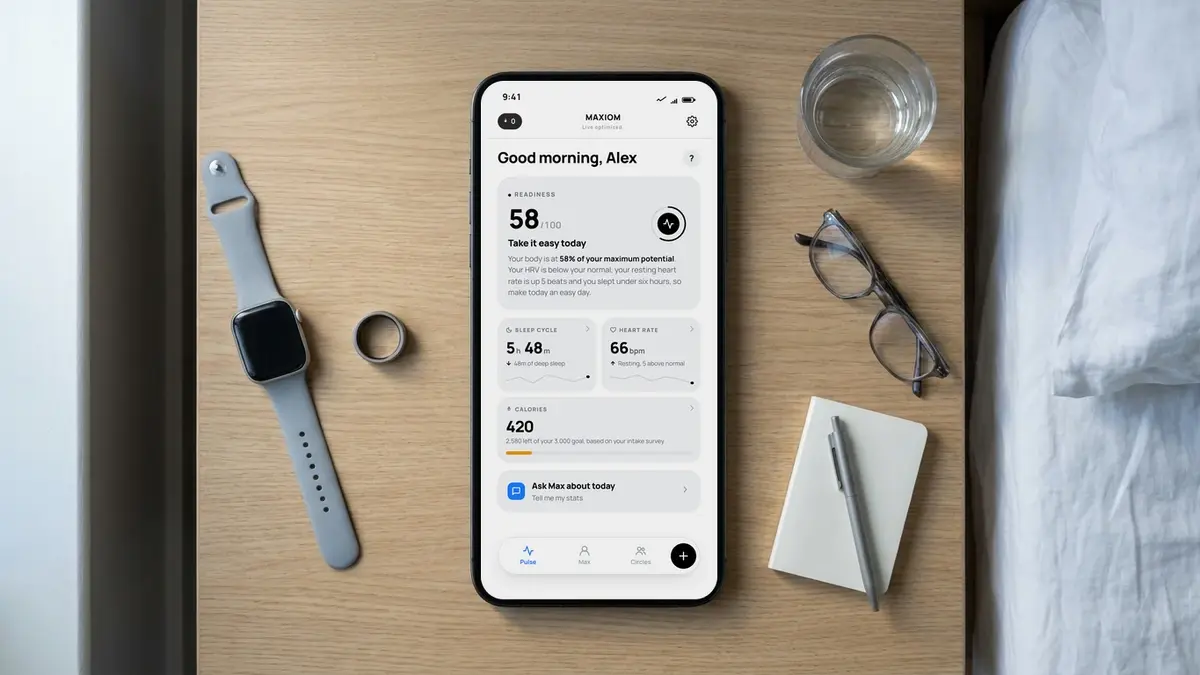
To make use of your wearable data, focus on four numbers: heart rate variability, resting heart rate, sleep and activity. Learn your own normal range for each over two to four weeks, then watch for changes that last several days rather than reacting to single readings. When two or more numbers move in the same direction, change one thing, such as how hard you train, when you go to bed or how much you eat.
The simple rule: your wearable collects the data, your baseline gives it meaning, and a change in your plan is what makes it useful.
If your HRV is well below your normal, your resting heart rate is up a few beats and you slept badly, that is a clear signal to take an easier day. One low HRV reading on its own is not.
Wearable Data at a Glance
- Which numbers matter most? Resting heart rate, heart rate variability, sleep duration and daily activity. They are the best measured and the easiest to act on.
- Which numbers to trust least? Calories burned and detailed sleep stages. Use them as rough guides, not exact figures.
- How long before the data is useful? About two to four weeks of wearing the device day and night, so it can learn your normal range.
- What should you compare against? Your own baseline, not population averages or other people.
- When should you act? When a change lasts three days or more, or when several numbers point the same way.
- What can a wearable not do? Diagnose a health condition. It can flag a pattern worth discussing with a doctor.
Why Most People Do Nothing With Their Wearable Data
Wearables are very good at collecting data and much weaker at telling you what to do with it. Most apps show dozens of numbers and scores, with little explanation of which ones matter or how to act on them. Many people end up checking their step count out of habit and ignoring the rest.
That gap matters more than it seems. In the IDEA trial published in JAMA in 2016, adults in a weight loss program who were given a wearable activity tracker lost less weight over two years than those who were not. The device alone did not change behaviour. Research on fitness trackers has repeatedly found that they work best when they are paired with a clear plan and support, not used as a scoreboard.
The lesson is not that wearables are useless. It is that data only helps when someone turns it into a decision.
Which Wearable Numbers You Can Trust
Not every number on your watch is equally accurate. Knowing which ones to rely on is the first step to using them well.
| Metric | How reliable it is | Best used for |
|---|---|---|
| Heart rate during steady activity | High | Training zones and effort |
| Resting heart rate | High, as a trend | Fitness, fatigue and early signs of illness |
| Heart rate variability | Good, as an overnight trend | Recovery and stress |
| Sleep duration | Fairly good | Whether you are getting enough sleep |
| Sleep stages | Rough estimate | Broad patterns only, not exact minutes |
| Steps and daily movement | Good | Overall activity levels |
| Calories burned | Low | Comparing active and less active days, not exact totals |
Calories are the weakest link. A Stanford study of seven wrist-worn devices found that heart rate readings were mostly accurate, but none of the devices measured calories burned well. Our guide to active calories vs total calories explains how to use these numbers without overeating.
The pattern across most devices is the same: numbers measured directly, like heart rate, are dependable. Numbers estimated by an algorithm, like calories and sleep stages, are best treated as trends.
The Four Wearable Metrics That Matter Most
Heart Rate Variability
Heart rate variability, or HRV, is the small variation in time between your heartbeats. A higher HRV than your usual generally means your body is rested and ready. A drop below your normal range often points to poor sleep, stress, illness or hard training that you have not recovered from.
HRV varies a lot between people and falls with age, so comparing your number to someone else's tells you very little. Our guide to HRV by age shows typical ranges and why your own trend matters more.
Resting Heart Rate
Resting heart rate is your pulse when you are fully at rest, usually measured overnight. It tends to fall as your fitness improves. A resting heart rate that climbs several beats above your normal for a few days is one of the earliest signs of fatigue, stress, dehydration or an illness coming on.
Sleep
Sleep duration and consistency are the most useful sleep numbers. Detailed stages are estimates, but they can still show broad patterns, such as nights with very little deep sleep after alcohol or a late meal. If your sleep chart confuses you, our guide to the stages of sleep explains what your tracker is showing.
Activity and Training Load
Steps, active minutes and training load show how much you are moving and how hard you are working. They matter most when you read them next to recovery. A hard week of training is only a problem if your HRV, resting heart rate and sleep show you are not keeping up.
After hard sessions, recovery heart rate is another useful fitness check. If you use an Apple Watch, our Cardio Recovery chart shows what your number means.
How to Use Your Wearable Data in Five Steps
- Wear it consistently: Wear your device day and night, including while you sleep, and charge it at a regular time when you are awake. Gaps in the data make every trend less reliable.
- Learn your baseline: Give it two to four weeks before drawing conclusions. Note your normal range for HRV, resting heart rate and sleep, not a single target number.
- Watch trends, not days: Look at weekly averages. One bad night or one low HRV reading is normal. A change that lasts three days or more is worth attention.
- Look for agreement: One number moving on its own is often noise. When two or three numbers move together, such as lower HRV, higher resting heart rate and shorter sleep, the signal is much stronger.
- Change one thing at a time: Adjust your training, sleep or eating, then watch what happens over the next week. Changing everything at once makes it impossible to know what worked.
What to Do When Your Numbers Change
This is the part most guides leave out. Here is how to turn common patterns into a decision.
| What you see | What it usually means | What to do |
|---|---|---|
| HRV and resting heart rate both in your normal range, good sleep | You are recovered | A good day for a hard session |
| HRV below normal for one day, everything else fine | Usually noise or one stressful day | Carry on, but avoid stacking hard days |
| HRV down and resting heart rate up for three days or more | Fatigue, stress or illness coming on | Take an easier day or two and prioritise sleep |
| Resting heart rate rising and you feel unwell | Your body may be fighting something | Rest, hydrate and skip hard training |
| Short sleep several nights in a row | Recovery is falling behind | Move your bedtime earlier, cut late caffeine and alcohol |
| Recovery heart rate slower than usual for weeks with the same training | Accumulated fatigue | Plan a lighter week |
| High active calories but your weight is not changing | Your watch is likely overestimating | Do not eat back every exercise calorie |
| Low steps on desk days | Low daily movement | Add short walks across the day |
These are general patterns, not medical advice. Your own response to training, sleep and stress is what your data is there to reveal.
When Your Wearable Data Is a Reason to See a Doctor
Contact a doctor if your device repeatedly alerts you to an irregular heart rhythm, if your resting heart rate stays unusually high or low with no clear reason, or if your numbers change alongside symptoms such as chest pain, fainting, dizziness or unusual shortness of breath. If you do see a doctor, bring a few weeks of trends rather than single readings. Patterns are far more useful in a consultation than one screenshot.
Common Mistakes With Wearable Data
- Comparing yourself to other people: HRV, resting heart rate and sleep needs vary widely. Your baseline is the only fair comparison.
- Reacting to every reading: Daily numbers move with stress, hydration, alcohol and how the device sat on your wrist.
- Trusting calorie numbers exactly: They are estimates and often run high.
- Chasing a perfect score: A lower score after a hard training week is your body responding normally.
- Tracking everything and acting on nothing: Fewer metrics that you actually use beat a dashboard you ignore.
- Ignoring how you feel: If your data says you are ready but you feel awful, listen to your body. Data and feel work best together.
How to Avoid Wearable Data Anxiety
More data is not always better. Some people find that constant tracking makes them anxious about sleep or turns every low score into a worry. If that happens, simplify. Turn off the metrics you never act on, check your data once a day instead of constantly, and focus on weekly trends. A wearable should make health decisions easier, not add another source of stress.
Where Max AI Fits In
The hardest part of wearable data is not collecting it. It is reading several numbers together, knowing your own normal and deciding what to change today. That is exactly what Max does.
Max AI is the health and fitness coach inside Maxiom. He connects with Apple Watch, Oura, Whoop, Garmin and Fitbit, and through Pulse he reads your HRV, resting heart rate, sleep, steps, training load and calories side by side. Pulse combines them into one score from 1 to 100, and you never have to work out your own baseline, because it does that for you.
He tells you what the numbers mean: Ask Max why your score dropped and he points to what moved, such as a short night, a fall in HRV or a heavy training week.
He tells you what to do: If your recovery is low, he eases your next workout and adjusts your meals to match, which is the idea behind adaptive recovery nutrition. If you are well recovered, he lets you push.
He knows your context: Max keeps your goals, injuries, conditions and medications in mind, so a beta blocker that lowers your heart rate or an old knee injury is part of his advice from the start. We explain why that matters in why generic AI gives dangerous health advice.
He keeps your people involved: In Circles, you share your progress with the people who keep you going, and Max adds a coaching comment to every post.
Think of him as a coach and a partner who looks at your data every day so you do not have to decode it yourself. If you want your wearable to finally tell you what to do, start with Maxiom and connect your device.
The Short Version
Your wearable is most useful for four things: HRV, resting heart rate, sleep and activity. Trust heart rate based numbers more than calories and sleep stages. Learn your own baseline over a few weeks, watch trends instead of single days and act when several numbers move together. Then change one thing at a time and see what happens. If you would rather have a coach read the data for you, Max does exactly that.
Frequently Asked Questions
What should I do with my wearable data?
Start by learning your normal range for heart rate variability, resting heart rate and sleep over two to four weeks. Then watch for changes that last several days, especially when two or more numbers move together. Use those changes to adjust one thing at a time, such as training intensity, bedtime or how much you eat. A wearable is most useful when its data leads to a clear decision.
Which wearable metrics are most important?
Resting heart rate, heart rate variability, sleep duration and daily activity are the most useful for most people. They are measured reasonably well by modern devices and are easy to act on. Calories burned and detailed sleep stages are less accurate and work best as rough guides. Focusing on a few reliable metrics is better than tracking everything.
How accurate is my wearable data?
Heart rate is generally the most accurate number a wrist wearable measures, especially at rest and during steady activity. HRV and sleep duration are useful as trends. Calories burned are the least reliable, and a Stanford study found that none of the seven devices it tested measured calories well. Treat estimated numbers as trends rather than exact figures.
How long does it take for wearable data to be useful?
Most devices need about two to four weeks of consistent wear to establish your baseline. That means wearing it during the day and while you sleep. Before then, single readings are hard to interpret because the device does not yet know what is normal for you. After that, changes from your own baseline become meaningful.
Should I compare my HRV or resting heart rate to other people?
No. HRV and resting heart rate vary widely between individuals because of age, genetics, fitness and lifestyle. A number that is low for one person can be normal for another. The useful comparison is with your own baseline over weeks, which shows whether you are recovering well or falling behind.
What does it mean when my HRV is low and my resting heart rate is high?
When HRV drops below your normal range and your resting heart rate rises above it at the same time, your body is usually under extra stress. Common causes are poor sleep, hard training you have not recovered from, alcohol, dehydration or an illness starting. If the pattern lasts several days, take an easier day and prioritise rest. See a doctor if it comes with symptoms or does not settle.
Can my wearable detect health problems?
A wearable can flag patterns worth paying attention to, such as an irregular rhythm alert or a resting heart rate that stays unusually high. It cannot diagnose a condition. If your device shows a persistent change or you have symptoms like chest pain or fainting, speak to a doctor. Bring a few weeks of trend data, since patterns are more useful than single readings.
Is it bad to track too much health data?
Tracking itself is not harmful, but some people find that constant checking makes them anxious about sleep or scores. If that happens, simplify by turning off the metrics you never act on and looking at weekly trends instead of every reading. Your data should make decisions easier. If it is adding stress, check it less often.
How does Max AI use my wearable data?
Max AI connects with Apple Watch, Oura, Whoop, Garmin and Fitbit and reads your HRV, resting heart rate, sleep, training load and calories together through Pulse. He compares them with your own baseline and explains why your recovery changed. He then adjusts your workouts and meals to match. He also keeps your goals, injuries and medications in mind, so his advice fits you.